MiniTool Partition Wizard Server 8
- Convert NTFS to FAT. New!
- Copy Dynamic disk volume. New!
- GPT Disk and MBR Disk interconversion. New!
- Copy UEFI boot disk.
- Convert GPT-style Dynamic Disk to Basic.
- Move Boot/System volume for Dynamic Disk.
- Read more...
Wipe Partition
Partition Wizard Help
Getting Started
Using MiniTool Partition Wizard
- MiniTool Partition Wizard Basic
- General
- Menu Of View
- Disk Operations
- Align All Partitions
- Copy Disk
- Delete All Partitions
- Rebuild MBR
- Initialize to MBR Disk
- Initialize to GPT Disk
- Partition Recovery
- Wipe Disk
- Disk Properties
- Convert Dynamic Disk to Basic Disk
- Convert MBR Disk to GPT Disk
- Convert GPT Disk to MBR Disk
- Surface Test
- Partition Operations
- Extend Partition
- Split Partition
- Align Partition
- Move/Resize Partition
- Merge Partition
- Copy Partition
- Explore Partition
- Create Partition
- Delete Partition
- Format Partition
- Label Partition
- Change Letter
- Set Active/Inactive
- Hide/Unhide Partition
- Check File System
- Convert FAT to NTFS
- Convert NTFS to FAT
- Wipe Partition
- Partition Properties
- Set Partition as Primary
- Set Partition as Logical
- Surface Test
- Change Partition Serial Number
- Change Partition Type ID
- Change Cluster Size
- Dynamic Disk
- Create Volume
- Delete Volume
- Format Volume
- Move/Resize Volume
- Wipe Volume
- Explore Volume
- Check File System
- Change Volume Label
- Change Volume Letter
- Change Volume Cluster Size
- Volume Properties
- Wizard
- Technical Support
Wipe Volume
-
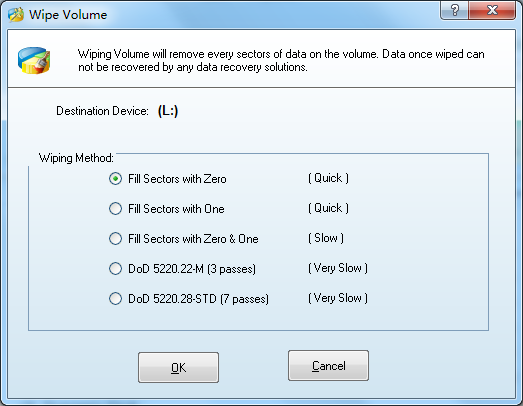
Wipe Volume can erase the data on the volume completely and ensure that the data can not be recovered by any data recovery solution. This function can prevent undesired recovery of your deleted data.
You can execute this function by clicking Wipe Volume in the Operations group of the Action Panel, or clicking on Volumes in the top menu and then clicking Wipe Volume.
You have several options after clicking Wipe Volume:
Fill Sectors with Zero.
Fill Sectors with One.
Fill Sectors with Zero & One. Fill sectors with 0 then fill sectors with 1.
DoD 5220.22-M Fill sectors with DoD calculation for 3 times.
DoD 5220.22-STD Fill sectors with DoD calculation for 7 times
Featured
Clients
Clients

















Copyright (C) 2009-2013 www.PartitionMagicServer.com, All Rights Reserved. Partition Magic ® is a registered trademark of Symantec Corporation.